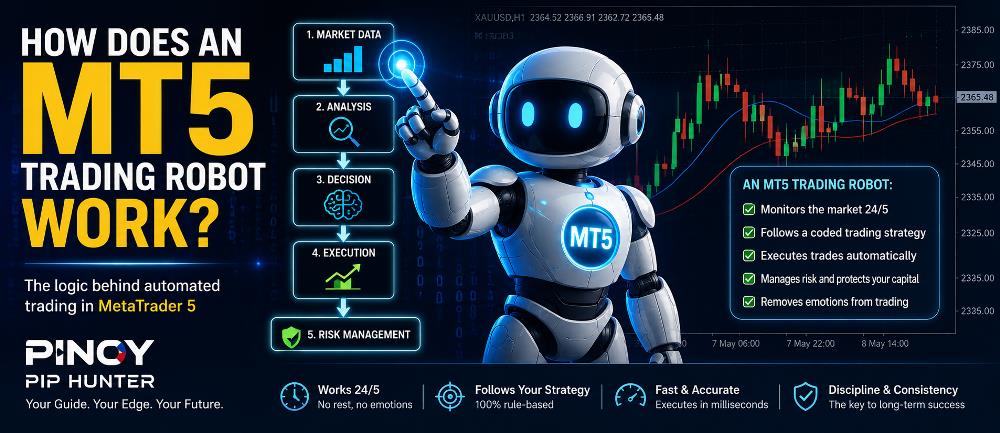
An MT5 trading robot is a computer program designed to analyze financial markets and perform trading actions automatically inside MetaTrader 5.
In MetaTrader terminology, these programs are normally called Expert Advisors, or EAs.
Instead of manually watching charts, waiting for a trading setup, opening a position and managing the trade yourself, an MT5 trading robot can perform some or all of these tasks according to predefined rules.
At its simplest, the process looks like this:
Market Data → Analysis → Trading Signal → Risk Check → Order Execution → Trade Management → Exit
The actual trading logic behind an EA can range from a simple moving-average strategy to a sophisticated algorithm containing dozens or hundreds of conditions.
If you are completely new to automated trading, first read our guide on what an Expert Advisor is in MetaTrader.
In this article, we will explain exactly how an MT5 trading robot works, what happens when an EA identifies a trading opportunity, and what traders should understand before allowing a robot to trade automatically.
What Is an MT5 Trading Robot?
An MT5 trading robot is an automated trading program designed to operate inside the MetaTrader 5 trading platform.
MetaTrader 5 robots are commonly developed using MQL5, or MetaQuotes Language 5.
According to the official MetaTrader 5 algorithmic trading documentation, trading robots can analyze prices according to preset algorithms, make trading decisions and execute trading operations automatically. (MetaTrader 5)
An MT5 robot can potentially be programmed to:
- Monitor market prices
- Analyze technical indicators
- Detect trading signals
- Calculate lot size
- Open BUY or SELL positions
- Set Stop Loss levels
- Set Take Profit targets
- Move stops to breakeven
- Apply trailing stops
- Modify existing trades
- Close positions
- Manage several trades
- Restrict trading by time or session
- Limit maximum account risk
The important point is that a conventional trading robot does not independently decide what strategy to use.
It follows the rules programmed into it.
How Does an MT5 Trading Robot Work?
An MT5 trading robot normally performs several processes continuously while MetaTrader 5 is running.
Let us look at each stage.
1. MT5 Receives Market Data
The process begins when MetaTrader 5 receives market information from your broker.
Depending on the instrument and broker, this may include:
- Bid price
- Ask price
- Price ticks
- Candlestick data
- Trading volume
- Spread
- Symbol specifications
- Open positions
- Pending orders
The Expert Advisor can read this information and compare it against its programmed strategy.
Many EAs perform calculations whenever a new price tick arrives.
This allows the robot to continuously monitor changing market conditions without requiring the trader to manually watch the chart.
2. The Robot Analyzes Its Trading Rules
Once market data is available, the EA checks whether its programmed trading conditions are satisfied.
Imagine a simple strategy with the following rule:
BUY when a fast moving average crosses above a slow moving average and momentum is positive.
The robot might check:
Condition 1: Is the fast moving average above the slow moving average?
Condition 2: Did the crossover occur recently?
Condition 3: Is momentum positive?
Condition 4: Is the spread below the maximum permitted level?
Condition 5: Is another trade already open?
If all required conditions are satisfied, the EA can generate a trading signal.
More sophisticated Expert Advisors may analyze many additional factors, including:
- Trend direction
- Volatility
- Support and resistance
- Trading sessions
- Multiple timeframes
- Indicator combinations
- Account equity
- Existing market exposure
This is the core idea behind algorithmic trading: trading decisions are translated into specific rules that a computer can evaluate.
For a broader introduction, see our Algorithmic Trading for Beginners guide.
3. The EA Generates a Trading Signal
When the required entry conditions are satisfied, the robot can generate an internal trading signal.
For example:
BUY SIGNAL
or
SELL SIGNAL
However, a properly designed EA may perform additional checks before actually sending an order.
These might include:
- Maximum allowed spread
- Current trading session
- Available margin
- Account equity
- Maximum number of trades
- Daily loss limits
- Previous trade status
- Volatility conditions
- Minimum distance between positions
- Time restrictions
This distinction is important.
A trading signal tells the EA that a potential opportunity exists.
The risk-management rules determine whether the robot is actually allowed to take that opportunity.
4. The Robot Calculates Position Size
Before opening a trade, the EA may determine how large the position should be.
Some robots use a fixed lot size.
For example:
Lot Size = 0.01
Other EAs calculate position size automatically based on variables such as:
- Account balance
- Account equity
- Risk percentage
- Stop Loss distance
- Instrument specifications
For example, an EA might be programmed to risk approximately 1% of account equity per trade.
The exact position-sizing method depends entirely on how the Expert Advisor was developed.
This is why risk settings should always be reviewed carefully before an EA is used with real money.
Automation can make execution more consistent, but it can also repeatedly execute an excessively risky strategy if the settings are incorrect.
5. MT5 Sends the Trading Order
Once the entry and risk conditions are satisfied, the Expert Advisor can submit a trade request through MetaTrader 5.
The robot may request actions such as:
- Open a market BUY
- Open a market SELL
- Place a pending order
- Modify a Stop Loss
- Modify a Take Profit
- Close a position
The communication flow can be simplified as:
Expert Advisor → MetaTrader 5 → Broker Trading Server → Trade Execution
The EA does not bypass your broker.
MetaTrader sends the trading request to the broker, and the broker processes the order according to its execution environment and account conditions.
The official MQL5 Reference explains that Expert Advisors can calculate trading signals and automatically send trading operations to the trading server. (MQL5)
6. The EA Manages the Open Trade
Opening a position may only be the beginning of the robot’s work.
After entry, an MT5 trading robot can continue monitoring the position and applying programmed trade-management rules.
Common examples include:
Stop Loss
A Stop Loss attempts to close the trade when price reaches a predefined adverse level.
Take Profit
A Take Profit attempts to close the position after price reaches a predetermined profit target.
Breakeven
The robot can move the Stop Loss toward the entry price once the trade reaches a specified level of profit.
Trailing Stop
A trailing mechanism can progressively move the Stop Loss as price moves further in the profitable direction.
Partial Close
Some trading robots can close only part of an open position while leaving the remaining portion active.
Basket Management
More sophisticated EAs may manage several trades together and close the entire basket when combined profit or loss reaches a predefined level.
This is why two robots using the same entry signal can produce very different results.
Their trade-management algorithms may be completely different.
7. The Robot Closes the Trade
Eventually, the position is closed according to the robot’s exit rules.
A trade might close because:
- Take Profit was reached
- Stop Loss was reached
- A trailing stop was triggered
- An opposite signal appeared
- Maximum holding time was reached
- A basket target was achieved
- A daily profit target was reached
- A maximum loss limit was triggered
- Market conditions no longer met the strategy rules
After the trade closes, the EA continues analyzing the market and waits for the next qualifying opportunity.
The cycle begins again:
Analyze → Signal → Risk Check → Execute → Manage → Exit → Repeat
Simple Example of How an MT5 Trading Robot Works
Suppose an EA trades EURUSD using a moving-average strategy.
Its programmed rules might be:
Entry Rules
- Wait for the 20-period moving average to cross above the 50-period moving average.
- Confirm that momentum is positive.
- Confirm that spread is below the maximum allowed level.
- Confirm that no existing BUY position is open.
- Open a BUY trade.
Risk Management
- Set a 50-pip Stop Loss.
- Set a 100-pip Take Profit.
Trade Management
- Move the Stop Loss to breakeven after the trade reaches +50 pips.
Exit
- Close automatically when the Stop Loss or Take Profit is reached.
Instead of the trader manually performing all nine steps, the EA applies the rules automatically whenever the required market conditions occur.
Does an MT5 Trading Robot Use Artificial Intelligence?
Not necessarily.
This is an important distinction.
A conventional Expert Advisor can operate entirely using predefined rules such as:
IF Condition A + Condition B + Condition C are true → BUY
That is algorithmic trading, but it does not automatically mean the robot uses artificial intelligence.
Some advanced systems may incorporate technologies such as:
- Machine learning
- Neural networks
- Statistical models
- Python
- External databases
- AI-based market analysis
However, a traditional MT5 Expert Advisor does not need artificial intelligence to operate.
The terms automated trading, algorithmic trading, and AI trading should therefore not be treated as identical.
Does MetaTrader 5 Need to Stay Open for an EA to Work?
If the EA is running locally on your computer, MetaTrader 5 generally needs to remain open, connected to the broker and operating normally.
If your computer is:
- Turned off
- Disconnected from the internet
- Put into sleep mode
- MetaTrader 5 is closed
the locally hosted EA will no longer be able to continuously process market events and submit new trading instructions.
This is why automated traders sometimes use a VPS, or Virtual Private Server.
A VPS acts like a remote computer that can keep MetaTrader running continuously even when your personal computer is switched off.
How Do You Install an MT5 Trading Robot?
Before an EA can operate, it needs to be installed correctly in MetaTrader 5.
The process normally involves:
- Opening the MT5 Data Folder
- Locating the MQL5 folder
- Opening the Experts folder
- Copying the EA file
- Refreshing the Navigator
- Attaching the EA to a chart
- Configuring its inputs
- Enabling automated trading
Our complete tutorial explains the procedure step by step:
How to Install an Expert Advisor in MT5
MetaTrader’s official documentation also confirms that an Expert Advisor is started by attaching it to a chart from the Navigator. (MetaTrader 5)
What Is the Algo Trading Button in MT5?
Installing an Expert Advisor does not automatically give it permission to open trades.
MetaTrader 5 includes controls that determine whether Expert Advisors are allowed to execute trading operations.
If automated trading is disabled, an EA may still analyze market conditions while being prevented from placing trades.
According to the official MetaTrader documentation, the platform-level Allow Auto Trading option enables or prohibits trading through Expert Advisors and scripts. (MetaTrader 5)
This is one of the first settings to check when an EA appears to be running but is not opening positions.
We will cover this subject in detail in:
Article #18 — How to Enable Algo Trading in MT5
Can Multiple MT5 Trading Robots Run at the Same Time?
Yes.
Different Expert Advisors can generally operate on different charts.
For example:
Chart 1: EURUSD — EA A
Chart 2: XAUUSD — EA B
Chart 3: GBPUSD — EA C
MetaTrader states that one Expert Advisor can run on a particular chart at a time. Different charts can therefore host their own EA instances. (MetaTrader 5)
However, using multiple robots on the same account creates additional risk considerations.
The EAs may collectively affect:
- Available margin
- Account equity
- Total exposure
- Drawdown
- Correlated positions
- Simultaneous trades
Three individually conservative trading robots can still create aggressive overall exposure when operating together.
Risk should therefore be evaluated at the account level, not only EA by EA.
What Happens If Two EAs Trade the Same Symbol?
Multiple EAs may potentially trade the same instrument, but the result depends heavily on how the programs are designed and how positions are handled.
Developers often use identifiers and position-selection logic to distinguish trades belonging to different strategies.
Poorly designed trade-management logic could potentially cause one EA to interfere with positions belonging to another strategy.
For this reason, multiple automated systems should be thoroughly tested before they are allowed to operate together on a live account.
How Do You Test an MT5 Trading Robot?
MetaTrader 5 includes a built-in Strategy Tester designed for testing and optimizing Expert Advisors.
According to MetaTrader’s official Strategy Testing documentation, a normal backtest runs an EA using historical market data, while optimization can repeatedly test the strategy using different combinations of parameters. (MetaTrader 5)
If you already have an MT5 robot installed, follow our complete guide:
How to Backtest an Expert Advisor in MT5
Backtesting can help you evaluate statistics such as:
- Number of trades
- Net profit or loss
- Maximum drawdown
- Profit factor
- Win rate
- Average trade
- Consecutive losses
- Equity behavior
However, historical performance does not guarantee future results.
A profitable backtest should never be treated as proof that an EA will remain profitable in live market conditions.
Backtesting vs Forward Testing
Backtesting and forward testing are related but different.
Backtesting evaluates how an EA would have behaved using historical market data.
Forward testing observes how the robot performs on new incoming market data after the strategy and parameters have already been selected.
A sensible EA evaluation process might look like:
Backtest → Analyze Results → Forward Test on Demo → Review Performance → Consider Live Deployment
For more information, read our guide on how to forward test an Expert Advisor before live trading.
MT5 Trading Robot vs Manual Trading
Neither approach is automatically better.
Manual Trading
Manual traders personally decide:
- When to enter
- When to exit
- How much to risk
- Whether market conditions are suitable
This gives the trader discretion.
Automated Trading
A trading robot follows predefined instructions consistently.
It does not become tired, hesitate because of fear, or become overly confident after winning trades.
MetaTrader highlights this consistency as one of the key advantages of automated trading systems. (MetaTrader 5)
However, a robot can still execute a poor strategy very consistently.
Automation improves execution discipline. It does not automatically create a profitable strategy.
Advantages of an MT5 Trading Robot
An MT5 trading robot can provide several practical benefits.
Consistent Rule Execution
The robot follows the same programmed conditions repeatedly.
Fast Reaction
An EA can evaluate conditions and submit instructions very quickly after its programmed criteria are met.
Reduced Emotional Decision-Making
The EA does not experience fear, greed, hesitation or fatigue.
Continuous Market Monitoring
While MetaTrader and the trading environment remain operational, the robot can continuously monitor market conditions.
Automated Trade Management
Stop Loss, Take Profit, breakeven and trailing-stop rules can be managed automatically.
Backtesting Capability
MT5 provides a sophisticated Strategy Tester for evaluating Expert Advisors using historical market data.
If you are comparing MetaTrader platforms specifically for automated trading, read our MetaTrader 4 vs MetaTrader 5 comparison.
Risks of Using an MT5 Trading Robot
Trading robots also introduce important risks.
Strategy Risk
If the underlying trading strategy has no sustainable edge, automating it will not make it profitable.
Excessive Risk
Incorrect lot sizes or aggressive money-management systems can create substantial losses.
Over-Optimization
An EA can be optimized so closely to historical data that it looks excellent in backtesting but performs poorly on new market data.
Technical Problems
Automated trading may be affected by:
- Internet interruptions
- VPS problems
- Broker connection issues
- Wrong settings
- Programming errors
- Incorrect symbol names
- Disabled Algo Trading
- Incorrect chart timeframe
Changing Market Conditions
Markets change.
A strategy designed for a trending market may perform poorly during prolonged sideways conditions.
Volatility, spreads, liquidity and market behavior can also change over time.
Because of these risks, an Expert Advisor should never be viewed as a guaranteed profit machine.
Can an MT5 Trading Robot Trade Gold?
Yes.
An MT5 Expert Advisor can be designed specifically for XAUUSD, commonly known as gold.
A gold trading robot might analyze:
- Gold price movements
- Volatility
- Momentum
- Technical indicators
- Trading sessions
- Spread
- Entry and exit signals
However, the EA must be designed and configured correctly for the broker’s gold instrument.
If you are new to gold trading, read our guide on what XAUUSD is and how gold trading works.
Frequently Asked Questions
Can an MT5 robot trade automatically?
Yes.
An Expert Advisor can be programmed to analyze market conditions and automatically open, modify, manage and close trades when the required permissions are enabled.
Does an MT5 trading robot guarantee profit?
No.
An EA simply automates a trading strategy.
If the strategy performs poorly, the robot can lose money just as a manual trader can.
Can beginners use MT5 trading robots?
Yes, but beginners should first understand:
- How the EA enters trades
- How it exits trades
- Position sizing
- Stop Loss rules
- Maximum drawdown
- Trading frequency
- Strategy limitations
Installing an EA is much easier than properly evaluating one.
Does MT5 need internet for an EA?
For normal real-time automated trading, MetaTrader needs connectivity so it can receive market information and communicate with the broker’s trading server.
Can I test an EA without risking real money?
Yes.
MetaTrader 5 provides the Strategy Tester for historical testing, and traders can also use demo accounts for forward testing.
Can I run several EAs on MT5?
Yes.
Different EAs can be attached to different charts, although traders should monitor the combined risk across the entire account.
Final Thoughts
So, how does an MT5 trading robot work?
An MT5 trading robot receives market information, analyzes programmed conditions, identifies trading opportunities, applies risk-management rules, submits orders through MetaTrader 5 and then manages those positions according to its algorithm.
The basic workflow is:
Market Data → Analysis → Signal → Risk Check → Execution → Trade Management → Exit
The main advantage of automation is consistency.
A robot can execute the same strategy repeatedly without fear, greed or hesitation.
However, automation does not eliminate trading risk.
The performance of an MT5 trading robot still depends on:
- The quality of the trading strategy
- The quality of the programming
- Risk-management settings
- Market conditions
- Broker execution
- Proper testing
- Proper deployment
Before allowing any Expert Advisor to trade real money, understand exactly how it operates and test it thoroughly.
A logical next step is learning how MetaTrader evaluates automated strategies through its testing environment.
Be the first to comment