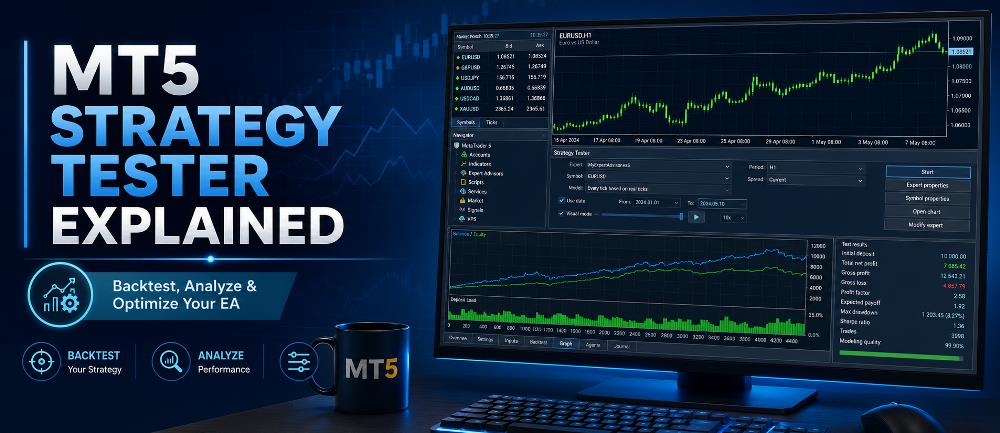
If you use Expert Advisors in MetaTrader 5, one of the most important tools to understand is the MT5 Strategy Tester.
The Strategy Tester is built directly into MetaTrader 5 and allows traders and EA developers to evaluate an automated trading strategy using historical market data before considering its use in live trading.
But the Strategy Tester can do much more than simply run a backtest.
It can also help you:
- Test an Expert Advisor on historical data
- Compare different EA settings
- Optimize input parameters
- Perform forward testing
- Visually inspect trades on a chart
- Simulate different execution conditions
- Test multi-currency strategies
- Analyze trading statistics
- Use multiple CPU cores for faster optimization
According to the official MetaTrader 5 Strategy Testing documentation, the tester can run an Expert Advisor once using fixed parameters or repeatedly with different parameter combinations during optimization.
If you are completely new to automated trading, you may want to first read our guide explaining what an Expert Advisor in MetaTrader is.
What Is the MT5 Strategy Tester?
The MT5 Strategy Tester is MetaTrader 5’s built-in environment for testing and optimizing automated trading systems.
Instead of waiting months to observe how an Expert Advisor behaves in real time, the Strategy Tester can simulate the EA’s operation over historical market data.
For example, imagine that you have an XAUUSD trading robot.
You could configure the Strategy Tester to simulate how that EA would have traded Gold during a historical period such as:
- One month
- Six months
- One year
- Several years
- Specific volatile market periods
The EA then processes the historical data according to its programmed rules.
Depending on the strategy, it may simulate actions such as opening trades, setting stop losses, placing take-profit targets, applying trailing stops, modifying positions, or closing trades.
This gives you a controlled environment where you can study how the trading system behaves.
Where Is the Strategy Tester in MT5?
There are several ways to open the Strategy Tester in MetaTrader 5.
The quickest method is:
Press Ctrl + R
You can also open it from the MT5 menu:
View → Strategy Tester
Once opened, the Strategy Tester normally appears in the lower section of the MetaTrader 5 platform.
From there you can select the testing task and configure the Expert Advisor, symbol, timeframe, testing period, modeling method, inputs, and other parameters.
If you have not installed your EA yet, follow our step-by-step guide to installing an Expert Advisor in MT5 first.
What Can the MT5 Strategy Tester Do?
The Strategy Tester has several major functions.
Understanding the difference between them is important.
1. Backtesting
Backtesting runs an Expert Advisor against historical market data using a defined set of EA parameters.
For example:
EA: Gold Trading Robot
Symbol: XAUUSD
Timeframe: M15
Test Period: January 2024 to December 2025
Starting Balance: $10,000
MetaTrader then simulates how that EA would have operated during the selected historical period.
A backtest can help you study:
- Number of trades
- Winning and losing trades
- Net profit or loss
- Drawdown
- Profit factor
- Recovery factor
- Expected payoff
- Trade duration
- Equity behavior
We have a separate tutorial showing the complete procedure here:
How to Backtest an Expert Advisor in MT5
That article focuses on how to perform a backtest, while this guide focuses on understanding the wider capabilities of the Strategy Tester.
2. Visual Testing
Sometimes statistics alone are not enough.
You may want to actually watch how an EA behaves on a chart.
This is where Visual Mode becomes useful.
With visualization enabled, MetaTrader displays historical price movements while showing the EA’s trading operations on the chart.
You can observe things such as:
- Where BUY trades were opened
- Where SELL trades were opened
- Where positions were closed
- How stop losses behaved
- How take profits behaved
- Whether the EA entered too early or too late
- Whether trailing-stop logic worked correctly
- Whether indicator signals aligned with entries
MetaTrader also allows you to adjust the speed of visual testing.
Visual testing is particularly useful when developing or troubleshooting an Expert Advisor because it lets you see behavior that may not be obvious from the final statistics.
MetaQuotes notes that Visual Mode displays an EA’s trading operations directly on a simulated historical chart.
MT5 Strategy Tester Modeling Modes
One of the most important settings in the tester is the modeling mode.
Different modes balance testing accuracy against testing speed.
Every Tick Based on Real Ticks
This is generally the most realistic available testing method when sufficient real tick data exists.
Instead of generating simulated ticks, MetaTrader uses historical tick information supplied by the broker.
This can be particularly useful for strategies that are highly sensitive to intrabar price movements, including:
- Scalping EAs
- Tight stop-loss strategies
- Tick-sensitive systems
- High-frequency entry logic
- Strategies using very small profit targets
The disadvantage is speed.
Real tick testing can require much more historical data and may take considerably longer than simpler modeling methods.
Every Tick
In this mode, MetaTrader generates tick movements using historical price information.
It provides detailed price simulation but does not necessarily use actual recorded broker ticks for every movement.
It can provide a useful balance between detailed simulation and availability of historical data.
1 Minute OHLC
In this mode, MetaTrader uses four price points for every one-minute candle:
- Open
- High
- Low
- Close
This makes the test much faster.
However, it provides less detail than tick-by-tick testing.
It may be suitable for some strategies that do not depend heavily on movements occurring inside each candle.
Open Prices Only
This is one of the fastest testing modes.
The EA is primarily evaluated when a new bar opens.
This can be appropriate for strategies specifically programmed to make decisions only at the opening of a new candle.
However, it may be inappropriate for an EA whose logic relies on intrabar movement.
Using an unsuitable modeling mode can make backtest results misleading.
Choosing the Correct Symbol and Timeframe
The selected symbol and timeframe should match the market environment the Expert Advisor was designed for.
For example, an EA designed specifically for:
XAUUSD M15
should not automatically be expected to produce meaningful results when tested on:
EURUSD H4
Changing the symbol or timeframe can fundamentally change:
- Volatility
- Spread behavior
- Price movement
- Trading frequency
- Stop-loss behavior
- Indicator calculations
- Session characteristics
Always understand the strategy’s intended market before interpreting test results.
Choosing a Testing Period
The Strategy Tester lets you define a historical period.
Avoid evaluating an EA using only a very short period that happens to suit the strategy.
For example, testing a trend-following EA only during a strong trending month may produce excellent results but reveal very little about how the strategy behaves in sideways conditions.
A stronger evaluation may include different environments such as:
- Trending markets
- Ranging markets
- High volatility
- Low volatility
- Major news periods
- Different trading sessions
- Different years
The objective is not to find the historical period that makes the EA look best.
The objective is to understand the system’s behavior under different conditions.
Initial Deposit and Leverage
MT5 also allows you to define the simulated account conditions.
These can include:
- Initial deposit
- Deposit currency
- Leverage
These settings matter because leverage affects margin requirements and can influence whether certain trades could realistically have been opened.
Whenever possible, configure the test environment so that it resembles the account conditions under which you expect the strategy to operate.
Simulating Execution Conditions
Real trading does not always occur under ideal execution.
MetaTrader 5 therefore provides testing options that can emulate execution delays.
This can help evaluate how an EA responds when there is a delay between sending a trade request and execution.
This is particularly relevant for strategies where small execution differences can matter.
Examples include:
- Scalping robots
- News trading EAs
- Very short-term strategies
- Systems using tight stops
- Strategies targeting very small price movements
A strategy that looks excellent under perfect historical execution may behave differently under realistic trading conditions.
What Is EA Optimization in MT5?
Optimization is different from normal backtesting.
During a normal backtest, MetaTrader runs the EA using one set of parameters.
During optimization, MetaTrader can repeatedly test different combinations of input values.
For example, suppose an EA has these adjustable parameters:
Stop Loss: 100–500 points
Take Profit: 200–1,000 points
Trailing Stop: 50–300 points
Instead of manually testing every combination, MT5 can systematically test many parameter sets.
This process is called EA optimization.
The objective is to identify parameter combinations that deserve further evaluation.
However, optimization should be used carefully.
Finding the parameter combination that produced the highest historical profit does not automatically mean you have found the best settings for future trading.
Complete vs Genetic Optimization
MetaTrader 5 provides different optimization methods.
Slow Complete Algorithm
The complete algorithm attempts to evaluate all possible combinations of the selected input parameters.
This can provide comprehensive results but may require substantial computing time when many variables are included.
For example, optimizing five parameters with dozens of possible values each can create thousands or even millions of combinations.
Fast Genetic Algorithm
The genetic algorithm searches for promising parameter combinations without exhaustively testing every possible combination.
This can dramatically reduce optimization time.
MetaQuotes explains that the genetic approach searches for stronger parameter combinations using an optimization algorithm instead of testing every combination individually.
For large optimization jobs, this can save substantial processing time.
You can read the official explanation in the MetaTrader 5 Optimization Types documentation.
What Is Forward Testing in MT5?
One of the biggest risks when optimizing a trading system is overfitting.
Overfitting occurs when parameters become excessively adapted to historical data.
The strategy may look excellent in the optimization period but perform poorly when exposed to different market data.
MT5 includes forward testing to help evaluate this problem.
The selected historical period can be divided into:
Backtest / Optimization Period
and
Forward Period
The EA is optimized on the first portion.
Selected parameter sets are then tested on the later, previously unused portion of historical data.
For example:
Total Data: 2022–2025
Optimization: 2022–2024
Forward Test: 2025
If a parameter set performs strongly during optimization but collapses during the forward period, its historical performance may have been overly dependent on the optimization data.
MetaQuotes specifically describes forward testing as a way to help identify parameter fitting to particular historical periods.
Forward Testing Is Not the Same as Demo Forward Testing
There are two concepts that traders sometimes call forward testing.
Strategy Tester Forward Test
This divides historical data into optimization and validation periods inside MT5.
Real-Time Demo Forward Test
This involves attaching the EA to a demo account and allowing it to operate on new market data as it arrives.
Both are useful, but they serve slightly different purposes.
After completing historical testing, read our guide:
How to Forward Test an Expert Advisor Before Live Trading
Understanding MT5 Strategy Tester Results
A profitable result alone is not enough.
Several statistics should be considered together.
Net Profit
Net profit shows the overall simulated gain or loss after the trades included in the test.
It is easy to understand, but it should never be considered in isolation.
A strategy earning $5,000 while experiencing a $9,000 drawdown may represent a very different risk profile from one earning the same amount with substantially lower drawdown.
Maximum Drawdown
Drawdown measures the decline from a previous equity or balance peak.
This is one of the most important risk statistics in automated trading.
Large drawdowns can indicate that the strategy may expose the account to significant periods of loss.
Profit Factor
Profit factor compares gross profit with gross loss.
A value above 1 means gross profit exceeded gross loss during the test.
However, profit factor should be considered together with:
- Number of trades
- Drawdown
- Test duration
- Market conditions
- Strategy type
A very high profit factor produced from only a handful of trades may not provide enough evidence to judge robustness.
Expected Payoff
Expected payoff estimates the average result per trade in the backtest.
It can help compare different parameter sets, but once again should not be viewed independently from risk and sample size.
Recovery Factor
Recovery factor relates the strategy’s profit to its drawdown.
It can help show how effectively the strategy generated returns relative to the drawdowns experienced during testing.
Sharpe Ratio
The Sharpe Ratio is another metric that can help evaluate performance relative to variability.
MetaTrader includes it among the statistics available when evaluating strategy results and optimization passes.
No single statistic proves that an EA is reliable.
The overall performance profile matters more than one impressive number.
Why the Number of Trades Matters
Suppose two backtests produce the following results:
Backtest A:
Profit: $5,000
Trades: 12
Backtest B:
Profit: $4,500
Trades: 800
The higher profit in Backtest A does not automatically mean it provides stronger evidence.
Twelve trades represent a very small sample.
Results can be strongly influenced by only one or two unusually successful trades.
A larger sample allows you to observe the strategy across more market situations.
The required sample depends heavily on the strategy and trading frequency, but traders should always consider whether the number of observations is sufficient to draw meaningful conclusions.
MT5 Uses Multiple Testing Agents
One major advantage of MetaTrader 5 is its multi-threaded Strategy Tester.
The platform can distribute testing and optimization work across multiple agents.
Local agents can use the logical processor cores available on your computer.
This means an optimization containing many parameter combinations can be processed in parallel rather than strictly one test at a time.
MetaTrader 5 can also work with remote agents and the MQL5 Cloud Network for additional computing capacity.
This is one reason MT5 is particularly useful for EA development and optimization.
MT5 Strategy Tester and Multi-Currency EAs
The Strategy Tester also supports multi-currency Expert Advisors.
A strategy may use information from several instruments even when attached to one main chart.
According to MetaQuotes, MT5 can automatically process the symbols required by a multi-currency trading strategy during testing.
This is useful for more advanced systems that analyze relationships between several markets.
Historical Data Matters
A Strategy Tester is only as useful as the data and assumptions used in the simulation.
Before testing, MetaTrader synchronizes historical information for the required instruments.
The official MetaTrader documentation on historical data preparation explains that MT5 downloads required M1 and tick data and prepares that information for the testing agents.
Differences in broker data can potentially produce different results.
Factors may include:
- Historical tick data
- Spread
- Symbol specifications
- Trading sessions
- Contract size
- Execution assumptions
- Commissions
- Swap
- Available history
Therefore, two traders testing the same EA through different brokers may not always obtain identical results.
Common MT5 Strategy Tester Mistakes
Beginners frequently make several mistakes when testing Expert Advisors.
Choosing the Most Profitable Result Only
The highest historical profit is not automatically the best parameter set.
Risk, drawdown, consistency, sample size, and forward performance also matter.
Testing Too Short a Period
A short test may capture only one particular market condition.
Ignoring Drawdown
Large profits can hide excessive risk.
Using the Wrong Modeling Mode
A tick-sensitive EA should not automatically be evaluated using a low-detail testing method.
Over-Optimizing
Repeatedly tuning parameters until historical results look perfect can lead to curve fitting.
Ignoring Trading Costs
Spread, commissions, swap, slippage, and execution differences can affect real-world performance.
Going Straight From Backtest to Live Trading
Historical performance cannot guarantee future profitability.
A more disciplined process usually includes historical testing followed by forward validation and demo testing.
A Better EA Testing Workflow
A practical testing workflow can look like this:
Step 1: Understand the EA’s trading logic.
Step 2: Install the EA correctly in MetaTrader 5.
Step 3: Run an initial backtest.
Step 4: Inspect trades in Visual Mode.
Step 5: Review profit, drawdown, trade count, and other statistics.
Step 6: Test different historical market conditions.
Step 7: Optimize only parameters that have a logical reason to be optimized.
Step 8: Use forward testing to check whether optimized settings remain reasonably stable outside the optimization sample.
Step 9: Run the EA on a demo account using real-time market data.
Step 10: Continue monitoring performance instead of assuming past results guarantee future returns.
This approach does not eliminate trading risk, but it provides a much stronger evaluation process than simply choosing the most profitable backtest.
Is a Good MT5 Backtest Enough?
No.
A good Strategy Tester report can demonstrate how an EA behaved under the assumptions and historical data used in the test.
It cannot prove how the EA will perform in the future.
Real trading introduces conditions that historical simulations may not perfectly reproduce, including:
- Changing spreads
- Slippage
- Execution latency
- Liquidity changes
- Broker conditions
- Unexpected volatility
- Structural changes in the market
This is why Strategy Tester results should be viewed as research evidence, not a guarantee of future profit.
Final Thoughts
The MT5 Strategy Tester is one of the most powerful tools available to traders working with Expert Advisors.
It provides much more than basic backtesting.
With it, you can evaluate historical performance, visually inspect trades, optimize parameters, perform forward validation, simulate execution conditions, test multi-currency strategies, and analyze detailed performance statistics.
Used properly, the Strategy Tester can help you understand how an automated trading system behaves before risking real capital.
The key is not to search for the most impressive historical profit.
Instead, use the tester to investigate risk, consistency, robustness, trading behavior, and sensitivity to different market conditions.
If you are ready to perform an actual test, continue with our complete tutorial:
How to Backtest an Expert Advisor in MT5: Step-by-Step Guide
And after completing historical testing, continue with:


Be the first to comment