
If you are interested in Forex robots, Expert Advisors, or algorithmic trading, one of the first decisions you may face is choosing between MetaTrader 4 and MetaTrader 5.
Both platforms support automated trading, technical indicators, Expert Advisors, and strategy testing. However, they are not simply two versions of the same software.
MetaTrader 4 (MT4) and MetaTrader 5 (MT5) use different programming environments and provide different capabilities for developing, testing, and running automated trading systems.
When comparing MetaTrader 4 vs MetaTrader 5 for automated trading, the biggest differences are found in their programming environment, testing tools, optimization capabilities, and support for more complex trading systems.
So which platform is better?
For traders starting a new automated trading system today, MetaTrader 5 generally provides the more advanced environment, particularly for strategy testing, optimization, multi-asset trading, and modern algorithm development.
However, MetaTrader 4 can still make sense for traders who already use established MT4 Expert Advisors, indicators, or broker setups.
In this beginner’s guide, we will compare MetaTrader 4 vs MetaTrader 5 for automated trading and help you decide which platform may better suit your trading system.
What Are MetaTrader 4 and MetaTrader 5?
MetaTrader 4 and MetaTrader 5 are trading platforms developed by MetaQuotes.
MetaTrader 4 is strongly associated with Forex trading and became widely known for its technical-analysis tools and support for Expert Advisors.
MetaTrader 5 is a newer multi-asset trading platform that provides additional capabilities for algorithmic trading, strategy development, testing, and optimization.
Both platforms allow traders to:
- Analyze price charts
- Use technical indicators
- Place trades
- Run Expert Advisors
- Create custom indicators
- Automate trading strategies
- Backtest automated systems
- Manage trading positions
The differences become more important once you start developing or testing automated trading systems.
What Is Automated Trading in MetaTrader?
Automated trading means allowing a software program to analyze market conditions and potentially execute trades according to predefined rules.
Inside MetaTrader, these programs are commonly called Expert Advisors, or EAs.
An Expert Advisor may be programmed to:
- Open buy or sell trades
- Set stop-loss levels
- Set take-profit targets
- Apply trailing stops
- Move trades to break even
- Filter entries using indicators
- Restrict trading times
- Manage multiple positions
- Close trades according to predefined rules
If you are unfamiliar with Expert Advisors, read:
What Is an Expert Advisor in MetaTrader? A Beginner’s Guide
You can also start with our introductory guide:
What Is Algorithmic Trading? A Beginner’s Guide
MetaTrader 4 vs MetaTrader 5 for Automated Trading: Quick Comparison
| Feature | MetaTrader 4 | MetaTrader 5 |
|---|---|---|
| Programming language | MQL4 | MQL5 |
| Expert Advisors | Yes | Yes |
| Custom indicators | Yes | Yes |
| Strategy testing | Yes | Yes |
| Advanced optimization | More limited | More advanced |
| Multi-currency testing | More limited | Supported |
| Cloud/distributed optimization | More limited | Supported |
| Forex trading | Yes | Yes |
| Multi-asset support | More limited | Stronger |
| Best for legacy EAs | Excellent | Requires MT5-compatible EA |
| Best for new advanced EA development | Capable | Generally stronger |
The right platform depends on whether you are maintaining an existing trading system or building a new one.
MQL4 vs MQL5: The Biggest Difference for Automated Trading
One of the most important differences between MT4 and MT5 is the programming language used to create automated trading systems.
MT4 Uses MQL4
MetaTrader 4 Expert Advisors are primarily developed using MQL4, or MetaQuotes Language 4.
MQL4 is commonly used for:
- Forex Expert Advisors
- Custom technical indicators
- Trading scripts
- Trade-management tools
- Automated Forex strategies
Because MT4 has been available for many years, there is a large collection of existing EAs and indicators designed specifically for MQL4.
MT5 Uses MQL5
MetaTrader 5 uses MQL5, or MetaQuotes Language 5.
MQL5 provides a more modern programming environment designed for creating:
- Expert Advisors
- Custom indicators
- Scripts
- Libraries
- Complex trading systems
- Multi-symbol strategies
For traders or developers starting a completely new automated trading project, MQL5 can provide greater flexibility.
You can also refer to the official MetaTrader algorithmic trading documentation for additional information about developing Expert Advisors.
Recommended external link: Link the phrase “official MetaTrader algorithmic trading documentation” to the official MetaTrader/MQL documentation website.
Can an MT4 Expert Advisor Work on MT5?
Not directly in most cases.
An Expert Advisor created for MT4 is generally written in MQL4, while an MT5 Expert Advisor uses MQL5.
Although the two languages share similarities, the platforms use different programming architectures and trading functions.
An MT4 EA may therefore need to be:
- Rewritten
- Converted
- Modified
- Recompiled
- Tested again
This is an important consideration when deciding between MetaTrader 4 vs MetaTrader 5 for automated trading.
If you already have a reliable MT4 Expert Advisor that has been extensively tested, moving it to MT5 may involve additional development and validation.
Which Platform Is Better for Backtesting?
Backtesting is one of the clearest differences when evaluating MetaTrader 4 vs MetaTrader 5 for automated trading, especially for developers who perform extensive strategy optimization.
Both platforms can test Expert Advisors using historical market data.
However, MetaTrader 5 provides a more advanced Strategy Tester.
MetaTrader 5 Strategy Tester
The MT5 Strategy Tester can be used to evaluate:
- Historical trading performance
- Entry and exit rules
- Stop-loss logic
- Take-profit logic
- Trading parameters
- Drawdown
- Profitability
- Optimization settings
MetaTrader 5 also provides stronger capabilities for testing strategies involving multiple symbols.
This can be particularly useful when an Expert Advisor monitors several currency pairs or trading instruments at the same time.
For additional technical information, refer to the official MetaTrader 5 Strategy Tester documentation.
Recommended external link: Link “official MetaTrader 5 Strategy Tester documentation” to the official MetaTrader 5 documentation.
What Is EA Optimization?
Optimization involves running a trading strategy repeatedly using different combinations of parameters.
Suppose an EA has the following inputs:
- Stop loss
- Take profit
- Trailing-stop distance
- Moving-average period
- Maximum number of trades
- Entry-filter settings
Instead of manually testing every combination, strategy optimization can test many different parameter sets.
This can help developers understand how changes in settings affect system performance.
However, optimization must be used carefully.
A parameter combination that produces the highest historical profit does not necessarily provide the best future performance.
Excessive optimization can result in overfitting, also known as curve fitting.
This happens when a strategy becomes too closely adapted to historical data instead of being robust enough to handle changing market conditions.
MT5 and Cloud-Based Optimization
One advantage of MetaTrader 5 is its ability to support distributed processing for large strategy-optimization tasks.
This is useful when an EA contains many adjustable parameters and thousands of possible combinations need to be tested.
For ordinary traders using relatively simple Expert Advisors, this may not be essential.
For developers building more sophisticated automated trading systems, however, additional processing capabilities can significantly reduce testing time.
Is MetaTrader 4 Still Good for Expert Advisors?
Yes.
MetaTrader 4 remains capable of running Expert Advisors and automated trading strategies.
MT4 Expert Advisors can:
- Analyze market data
- Generate trading signals
- Automatically open trades
- Manage positions
- Apply stop losses
- Apply take profits
- Use technical indicators
- Close trades according to programmed rules
For traders with established Expert Advisors, the MetaTrader 4 vs MetaTrader 5 for automated trading decision may depend more on compatibility than on which platform is newer.
If your existing MT4 EA works correctly and already meets your requirements, there may be no immediate need to migrate.
When MetaTrader 4 May Be the Better Choice
MT4 can still be the practical choice in several situations.
You Already Have an MT4 Expert Advisor
If your trading system has already been developed and thoroughly tested on MT4, staying with MT4 can avoid unnecessary redevelopment.
Converting an automated strategy to another platform may introduce:
- Programming errors
- Different execution behavior
- Changes in trade handling
- Indicator incompatibility
- Testing discrepancies
A stable existing system can be more valuable than switching platforms simply because another platform is newer.
Your Indicators Are Built for MT4
Many custom indicators have been developed specifically in MQL4.
If your Expert Advisor depends on those indicators, migrating to MT5 may require the entire system to be converted or recreated.
Your Trading Environment Is Already Built Around MT4
Some traders already operate a complete MT4 environment involving:
- Multiple trading accounts
- VPS hosting
- Custom indicators
- Templates
- Expert Advisors
- Scripts
- Trade copiers
If everything is functioning correctly, migration may provide little immediate benefit.
When MetaTrader 5 May Be the Better Choice
MetaTrader 5 becomes particularly attractive when you are developing a new automated trading system.
You Are Building a New EA
For new EA development, the comparison between MetaTrader 4 vs MetaTrader 5 for automated trading generally favors MT5 because of its more advanced testing and optimization environment.
MT5 provides access to:
- MQL5 programming
- Advanced strategy testing
- Optimization tools
- Multi-currency testing
- More sophisticated development functionality
For a completely new algorithmic trading project, these capabilities can make MT5 the stronger long-term platform.
You Want Better Strategy Testing
The MT5 Strategy Tester is one of the platform’s strongest tools for automated trading development.
It allows developers to evaluate trading systems against historical market data and test different combinations of strategy parameters.
You Trade Multiple Markets
MetaTrader 5 was designed as a multi-asset trading platform.
Depending on the broker, traders may have access to markets such as:
- Forex
- Stocks
- Futures
- Indices
- Commodities
- Other CFDs
This makes MT5 attractive to traders who may eventually expand beyond Forex.
You Are Developing More Complex Trading Systems
Advanced Expert Advisors may require:
- Multiple symbols
- Complex trade-management logic
- Large optimization runs
- Extensive historical testing
- Custom analytical functions
- More advanced position management
MT5 is generally better suited to these types of development projects.
MT4 vs MT5 Trade Management
Trade management is another important area where MT4 and MT5 differ.
The platforms were built around different trading architectures.
This means the programming used to manage:
- Orders
- Positions
- Stop losses
- Trade history
- Partial closes
- Multiple entries
can differ between MQL4 and MQL5.
This becomes particularly important when converting an existing Expert Advisor.
A strategy that appears simple from a trading perspective can require significant programming changes when moved from one platform to another.
Can MT5 Run Multiple Expert Advisors?
Yes.
MetaTrader 5 can run different Expert Advisors on multiple charts.
For example, a trader might operate:
- One EA on EUR/USD
- One EA on GBP/USD
- One EA on XAU/USD
- A separate trade-management EA
However, multiple automated systems must be programmed carefully when they operate on the same trading account.
Poorly designed Expert Advisors may interfere with each other’s positions.
Can MT4 Run Multiple Expert Advisors?
Yes.
MetaTrader 4 can also run different EAs on multiple charts.
For example, a trader may have separate Expert Advisors managing different currency pairs or different trading strategies.
Developers often use identifiers such as Magic Numbers so that an EA can recognize which trades belong to its own strategy.
This becomes especially important when several Expert Advisors operate simultaneously.
Does MetaTrader 5 Execute Trades Faster Than MetaTrader 4?
It is not accurate to assume that simply switching to MT5 will automatically make every trade execute faster.
Actual execution speed depends on several factors, including:
- Broker infrastructure
- Internet connection
- VPS location
- Market liquidity
- Trading instrument
- Spread
- Slippage
- EA programming
- Broker server latency
The trading platform itself is only one part of the execution chain.
For automated trading, a well-programmed EA running with a suitable broker and reliable VPS may be more important than selecting a platform solely because one is newer.
MT4 vs MT5 for Forex Trading Robots
If your main objective is to run an existing Forex robot, MT4 may still be completely adequate.
However, if you are:
- Building a new Forex EA
- Performing extensive backtesting
- Optimizing many parameters
- Testing multiple symbols
- Planning future strategy development
MetaTrader 5 generally provides the stronger development environment.
The right choice in MetaTrader 4 vs MetaTrader 5 for automated trading ultimately depends on whether you are maintaining an existing system or developing a new one.
MT4 vs MT5 for Gold Trading EAs
Both MT4 and MT5 can be used for automated Gold trading when the broker offers XAU/USD or another suitable Gold instrument.
Gold Expert Advisors may use strategies based on:
- Momentum
- Trend direction
- Volatility
- Breakouts
- Technical indicators
- Price channels
- Support and resistance
The platform itself does not determine whether a Gold EA will be profitable.
Strategy design, risk management, trade execution, and testing are much more important.
For a new Gold trading robot, however, MT5’s enhanced testing and optimization environment can provide an advantage during development.
MT4 vs MT5 for Scalping EAs
Scalping EAs attempt to capture relatively small market movements, often with short holding periods.
Execution conditions can therefore be particularly important.
Factors that may affect a scalping EA include:
- Spread
- Commission
- Slippage
- Broker execution
- VPS latency
- Market liquidity
- Trading session
- Economic news
Both MT4 and MT5 can run scalping strategies.
Neither platform should automatically be considered more profitable for scalping.
A strategy should instead be tested under realistic broker and market conditions.
Which Is Easier for Beginners: MT4 or MT5?
For basic trading and chart analysis, beginners can learn either platform.
For automated trading, however, the decision depends on your objective.
MT4 may appear simpler because it has been available for many years and there are many existing EAs and indicators.
MT5 may be the better platform to learn if your long-term goal is specifically to develop new algorithmic trading systems.
Starting directly with MT5 can reduce the need to learn one programming environment and later migrate to another.
Should You Learn MQL4 or MQL5?
If you already maintain MT4 Expert Advisors, learning MQL4 remains useful.
If you are beginning from scratch and plan to build new automated trading systems, MQL5 is generally the stronger long-term choice.
MQL5 can be used to create:
- Expert Advisors
- Custom indicators
- Scripts
- Libraries
- Trading utilities
- Complex automated strategies
The programming language you choose should ultimately depend on the platform on which your trading system needs to operate.
Do You Need Programming Knowledge to Use MT4 or MT5 EAs?
No.
You do not need to be a programmer simply to operate an existing Expert Advisor.
Normally, the user installs the EA, attaches it to the appropriate chart, configures the input settings, and enables automated trading.
Programming knowledge becomes more useful when you want to:
- Build your own strategy
- Modify trading rules
- Create custom indicators
- Diagnose errors
- Add risk-management functions
- Convert MT4 code to MT5
- Improve EA functionality
Even if you do not write the code yourself, you should still understand how the trading strategy works.
Can You Backtest an EA Before Using Real Money?
Yes.
Backtesting should usually be one of the first stages when evaluating an automated trading strategy.
A backtest allows you to observe how an EA would have behaved using historical market data.
You may analyze:
- Total profit
- Total loss
- Number of trades
- Win rate
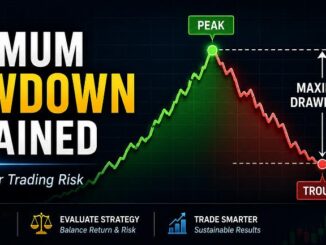
- Maximum drawdown
- Profit factor
- Average trade duration
- Risk exposure
However, historical results cannot guarantee future performance.
Backtesting should ideally be followed by forward testing.
What Is Forward Testing?
Forward testing involves running the EA under current market conditions.
A demo account is often used during this stage.
Forward testing may reveal issues involving:
- Spread
- Slippage
- Broker execution
- VPS performance
- Trade timing
- Incorrect EA settings
- Strategy behavior
A trading system that performs well in historical testing may behave differently under current market conditions.
MT4 vs MT5 for VPS Trading
Both MetaTrader 4 and MetaTrader 5 can operate continuously on a Virtual Private Server.
A VPS is commonly used for automated trading because Expert Advisors normally require the trading terminal to remain active and connected.
When selecting a VPS, consider:
- Reliability
- Server location
- Latency
- Uptime
- CPU resources
- Memory
- Connection stability
A reliable hosting environment is particularly important for Expert Advisors that need to monitor the market continuously.
Is MT4 Being Replaced by MT5?
MetaTrader 5 is the newer and more advanced platform, but that does not mean every MT4 trader must immediately migrate.
Many established automated trading systems were originally developed for MT4.
For these users, compatibility and stability may be more important than moving to a newer platform.
For entirely new development projects, however, MT5 is generally the more logical starting point.
MetaTrader 4 vs MetaTrader 5: Which Is Better for Automated Trading?
The answer depends on your situation.
Choose MetaTrader 4 if:
- You already use a reliable MT4 EA
- Your indicators are written in MQL4
- Your trading infrastructure is built around MT4
- You do not require more advanced testing tools
- Migrating would require substantial redevelopment
Choose MetaTrader 5 if:
- You are starting a new automated trading system
- You want more advanced backtesting
- You require strategy optimization
- You want multi-currency testing
- You plan to develop complex Expert Advisors
- You may trade markets beyond Forex
- You are learning automated trading development from scratch
For most new algorithmic-trading projects, MetaTrader 5 is generally the stronger overall choice.
However, an established MT4 system does not automatically become ineffective simply because it operates on an older platform.
The quality of the trading strategy remains more important than the platform name.
Frequently Asked Questions
Is MetaTrader 5 better than MetaTrader 4 for automated trading?
For new automated trading development, MT5 generally provides a more advanced environment because of its strategy-testing, optimization, multi-currency, and MQL5 development capabilities.
Can I use the same Expert Advisor on MT4 and MT5?
Usually not directly.
MT4 Expert Advisors are primarily written in MQL4, while MT5 EAs use MQL5.
The EA may therefore need to be converted, modified, or rewritten.
Is MT4 still good for trading robots?
Yes.
MT4 remains capable of running automated trading systems and Expert Advisors.
It can be particularly practical when a trader already has a stable MT4 EA.
Is MT5 only for Forex?
No.
MetaTrader 5 is designed as a multi-asset platform.
The markets available will depend on the broker.
Is MT5 better for backtesting?
For advanced EA testing and optimization, MT5 generally provides the more capable testing environment.
Should a beginner learn MT4 or MT5?
If your objective is to develop new automated trading systems, MT5 is generally the better long-term platform to learn.
If you already use an established MT4 trading system, learning MT4 may still be appropriate.
Can I run MT4 and MT5 on the same computer?
Yes.
MT4 and MT5 can be installed separately and operated on the same computer, provided the system has sufficient resources.
Final Thoughts
When comparing MetaTrader 4 vs MetaTrader 5 for automated trading, there is no single answer that applies to every trader.
MetaTrader 4 remains a capable platform for established Expert Advisors, existing MQL4 indicators, and mature Forex trading systems.
MetaTrader 5 provides a more modern development environment and stronger tools for backtesting, optimization, multi-currency strategies, and advanced algorithmic trading.
For traders who already have a stable MT4 system, continuing with MT4 can be completely reasonable.
For traders beginning a new automated trading project, however, MetaTrader 5 is generally the better long-term choice.
Therefore, when choosing MetaTrader 4 vs MetaTrader 5 for automated trading, consider your existing Expert Advisors, programming requirements, backtesting needs, broker support, and long-term development plans.
Most importantly, remember that choosing a platform does not guarantee trading success.
A successful automated trading system still depends on:
- A logical trading strategy
- Proper risk management
- Reliable programming
- Backtesting
- Forward testing
- Realistic expectations
- Appropriate broker execution
The platform is the tool.
The strategy determines how the system behaves.

5 Trackbacks / Pingbacks